FTF Platforms

2026

Three roles. Three workspaces. One governed system.

Assistiv had one interface for admins, instructors, and learners. As the sole designer, I was responsible for separating those jobs without splitting the data and rules underneath. I redesigned the navigation, permissions, onboarding, admin risk workflow, and the first AI course-creation flow. The main decision was architectural: each role needed its own starting point, but courses, people, permissions, and audit history still had to behave as one product.

Role

Sole Product Designer

Timeline

2025 - 2026

Team

1 Founder and 12 Engineers

Platform

Figma

Role

Sole Product Designer

Timeline

2025 - 2026

Team

1 Founder and 12 Engineers

Platform

Figma

Overview

Re-architecting an enterprise LMS around three fundamentally different jobs

Assistiv had grown from an admin tool into a platform used by administrators, instructors, and learners. The product had changed, but its structure had not. My role was to redesign that structure without turning the platform into three disconnected products.

I worked directly with the founder and four engineers across navigation, permissions, onboarding, reporting, course management, and AI-assisted course creation. The platform expanded from 20 to more than 100 enterprise clients during this period.

Each role starts somewhere different

Admins start from the institutions, instructors from courses, and learners from assigned work.

Risk is visible before a query

The admin homepage loads at-risk cohorts on load and carries that context into the next action.

New features reuse the same rules

Custom roles, messages, AI signals, and onboarding all use the same permission and audit model.

Problem

The product had three user types, but only one structure.

Assistiv started as an admin product. As instructors and learners were added, their features were placed inside the same navigation.

I first considered keeping one information architecture and hiding destinations by permission. It was faster to build, but every role still had to understand a structure that was not organized around their job.

She didn't need a better button but a better homepage.

What the instructor churn incident made clear.

Considered, then rejected

One IA with role filters

Shared navigation

Items hidden by role

+

Lower engineering effort, but the product still began from an admin-shaped structure.

Defining Decision

Three workspaces, one data model

Admin

Instructor

Learner

Each role gets its own homepage and navigation. Courses, learners, permissions, and audit history remain shared.


Architecture

I separated the product around the job each role came to do.

The role now determines the first screen, the main object, and what the user is allowed to change. The backend objects remain shared.

Starts from

Institute overview

Admin

Monito institutional risk

Primary object

The cohort

Authority

Oversight, read-only on academic records

Instructor

Create and deliver learning

Starts from

Course workspace

Primary object

The course

Authority

Authoring and grading

Learner

Complete assigned training

Starts from

Learning queue

Primary object

The activity

Authority

Own progress only

  • Start from institutional rish

    Admins begin with institution health, risk signals, and the cohorts that need attention

  • Start from courses

    Instructors begin with the courses they own, their learners, and the work they need to create

  • Start from assigned learning

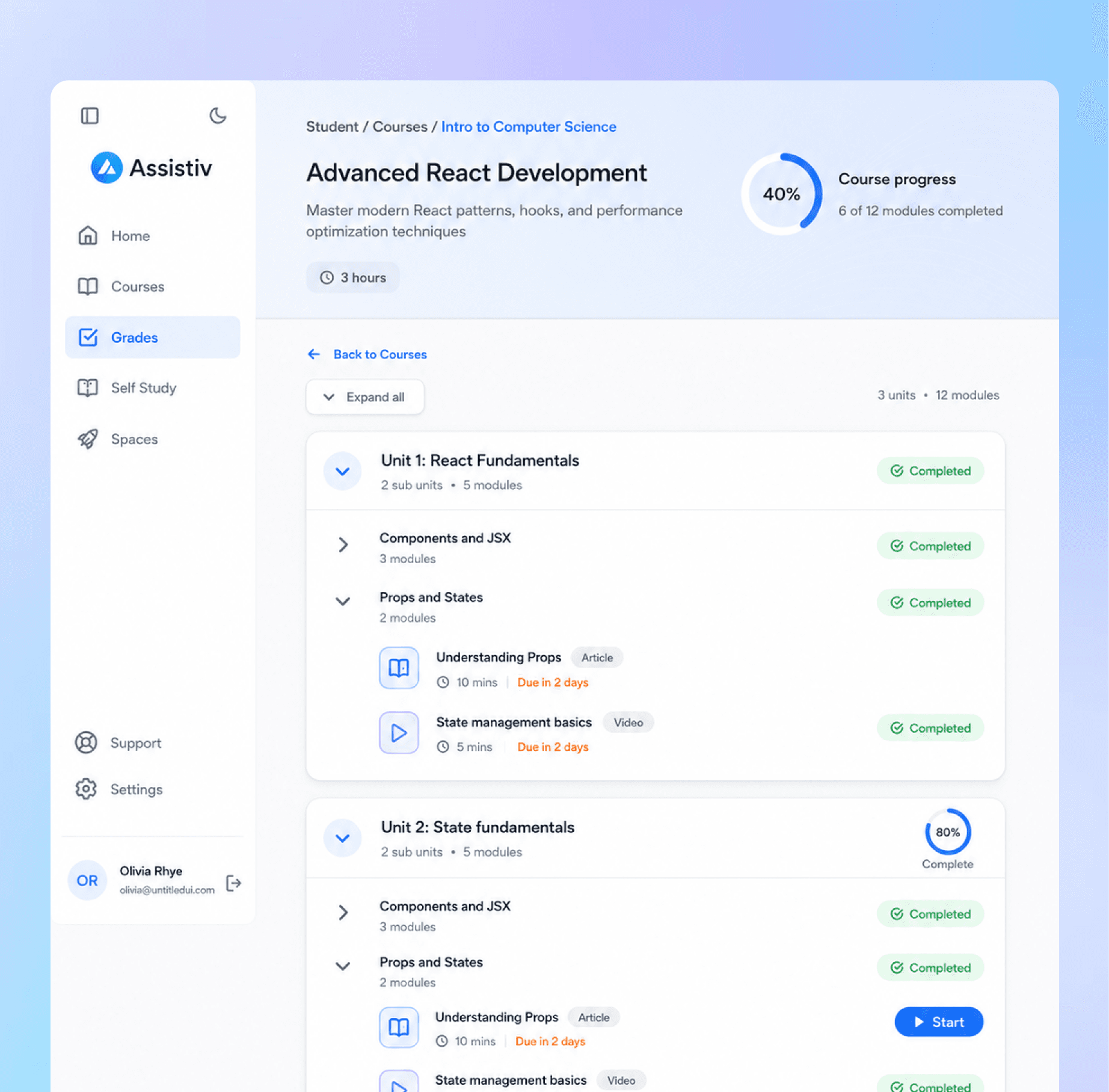
    Learners see the course structure and progress, without admin or authoring controls.

The role is selected before the workspace loads. The choice changes the homepage, navigation, and default tasks, not only the items hidden in a shared menu.

The old dashboard made admins build the answer themselves.

Admins came to Assistiv to find people who needed attention. The reporting flow made them assemble that answer every time.

To find a learner who was falling behind, an admin selected a group, course, quiz, and attempt type, then scanned the table manually. The report contained the data, but it did not prioritize it.

Reports and Insights

A site director who also taught courses could not find course creation and stopped using the product. That made role separation the next release, not a later navigation cleanup.

Intervention

I replaced the report-first homepage with a ranked worklist.

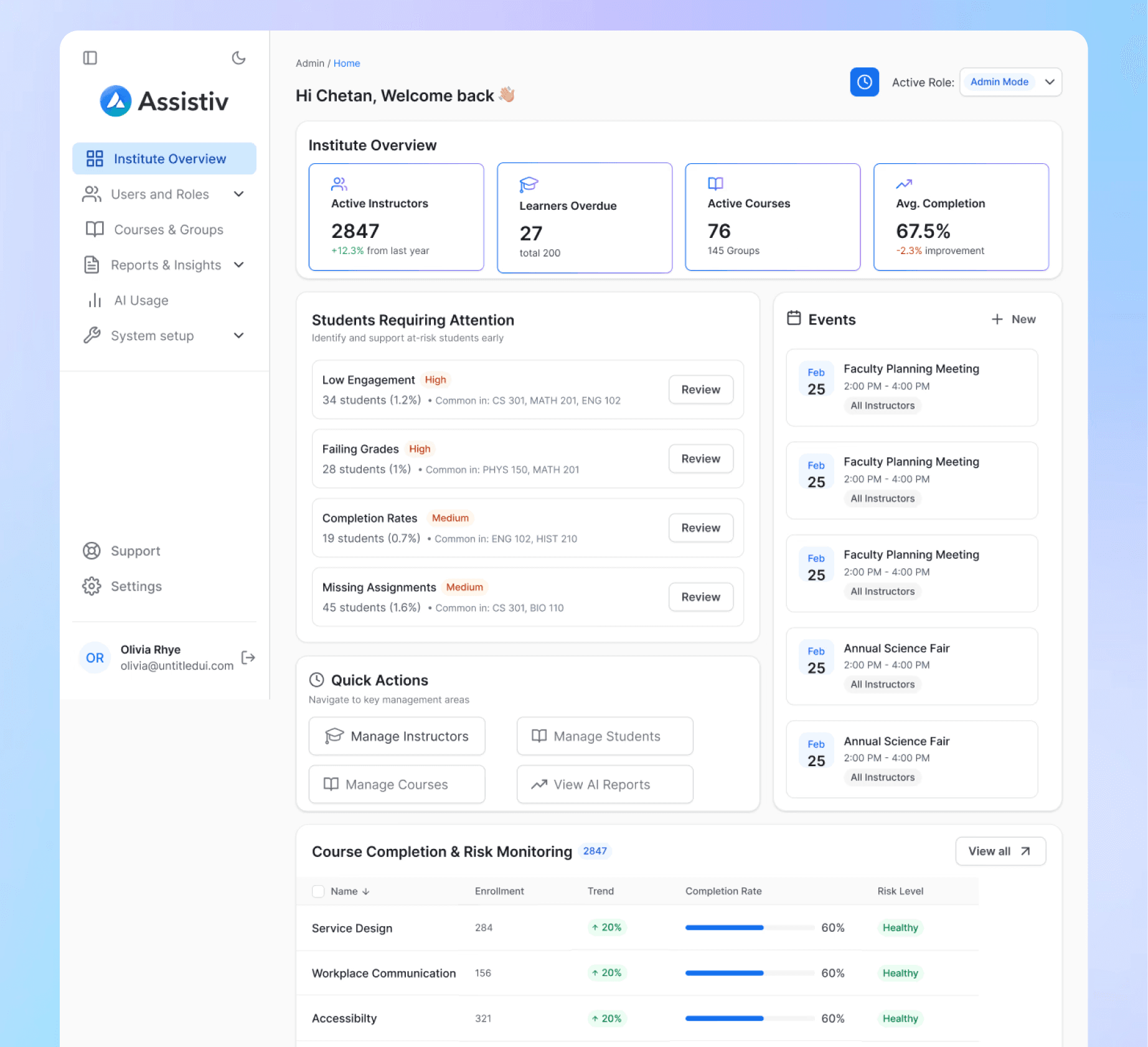
The page now answers one question before the admin touches a filter: Who needs attention today?

Risk is ranked on load

High-risk cohorts appear first, with the signal and affected learner count.

The signal opens to a cohort

The next screen shows the learners and courses behind that signal.

The admin sees the learner in context

The record shows recent activity, missed work, and relevant course context without exposing grading controls.

The action is recorded

The reminder is sent and written back to the learner’s history with the sender and timestamp.

Institute Overview

Risk is ranked on load. Every row carries severity, cohort size, affected courses, and a direct Review action.

Admins can investigate without taking over grading

Admins can review the risk signal and learner history, but grades remain read-only and under instructor authority.

Reminders stay attributable

Templates reduce repetitive writing, but every reminder still records who sent it and when.

Scales & AI

The same role model had to work beyond navigation.

After the three workspaces shipped, I used the same role, permissions, and audit rules for the next set of enterprise requirements.

Custom roles did not create a fourth product

Clients can group permissions for non-standard teams while the three default workspaces stay intact.

Permissions

Course access follows the same permission model

Open links, passcodes, and domain restrictions are configured without bypassing role ownership or auditability.

Access

The empty dashboard becomes onboarding

With no data, the risk area shows setup steps instead of an empty chart.

Onboarding

Messages use the same audience model

Institution-wide messages must explicitly target Admin, Instructor, Learner, or everyone.

Communication

Courses stay the same object across admin and instructor views.

The surrounding controls change by role, but enrollment, progress, ownership, and access still refer to the same course record.

Shared object model

I stopped treating control as all-or-nothing.

Permissions, AI suggestions, and admin actions each needed a different level of human oversight.

One-click course generation failed in testing.

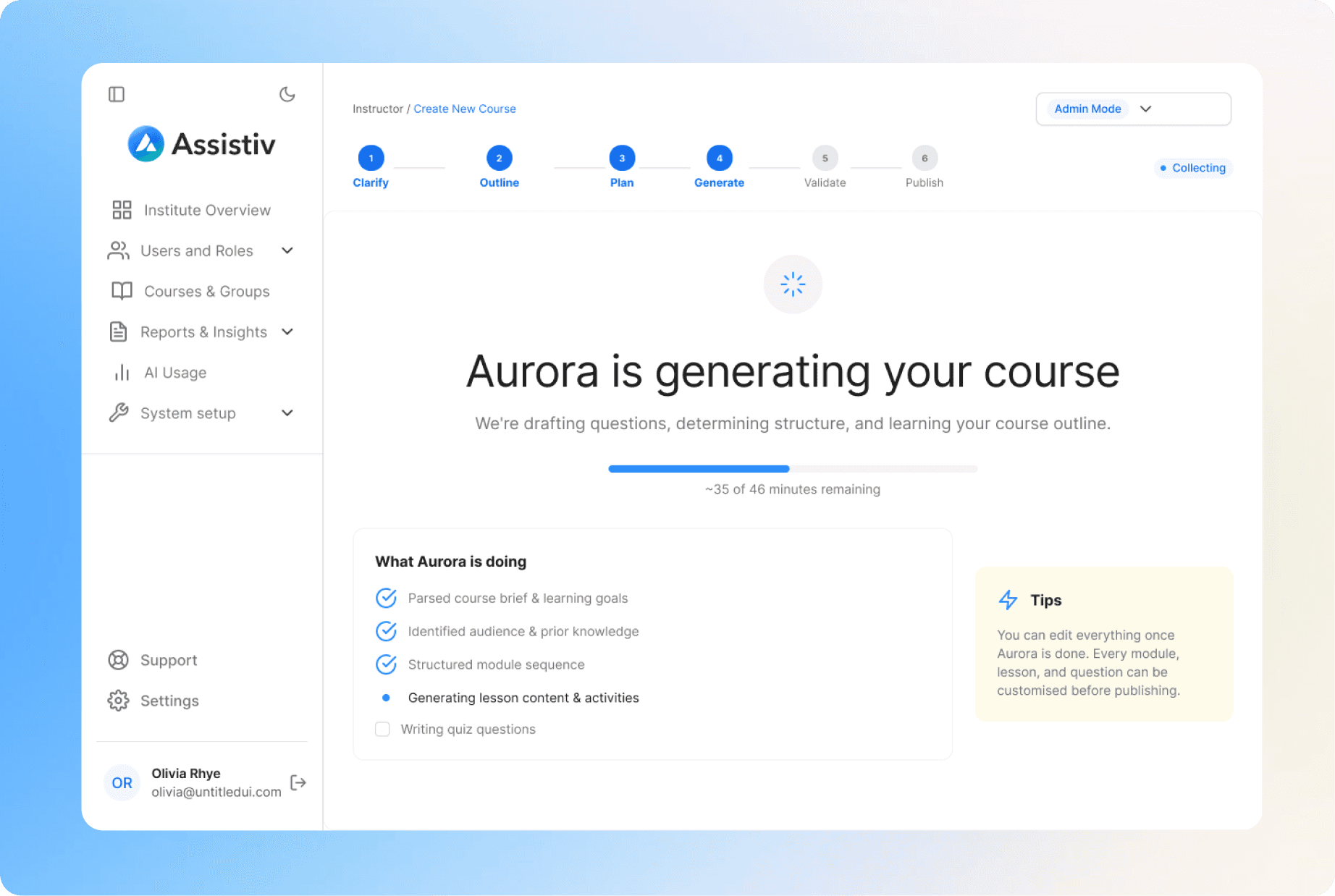
Once instructors had course creation, I explored where AI could remove setup work without taking away editorial control. The first concept was simple: upload source material and generate the whole course. In testing, instructors could not correct the structure until the end, so they spent their time repairing the output.

AI course creation

Choose a starting point

Prompt, materials, or manual creation.

01

I stopped treating control as all-or-nothing.

Permissions, AI suggestions, and admin actions each needed a different level of human oversight.

What I changed

1

Choose

2

Clarify

3

Outline

4

Plan

5

Generate

6

Publish

Validate and publish

Every section stays editable before release.

06

02

Clarify the audience

Structured questions replace prompt writing.

03

Review the outline

Structured questions replace prompt writing.

04

Plan the teaching flow

The instructor adjusts sequence and activity types.

05

Generate the course

Aurora builds only after the structure is approved.

Outcomes & Lessons

My contribution, and what I learned

0

Steps before risk is visible

Previously: four filters and a manual row scan. Now: ranked on page load.

Path from signal to action

Risk → cohort → learner → reminder, without rebuilding context.

1 path

Custom roles use the existing model

Non-standard teams can be configured without adding another navigation system.

Flexible

Actions are written to history

Every learner-facing intervention includes the actor and timestamp.

Auditable

Platform context during the same period

These numbers show the size of the environment. They are not presented as direct design impact.

20 -> 100+

Enterprise clients

2,847

Active Instructors

67.5%

Average learner completion

How I led

Aligned the founder on role separation over a permissions filter, mapped the permission model with backend engineering before designing the UI, sequenced rollout so admin shipped first, ran partner research sessions directly with four client organisations, and reviewed implementation screen by screen with the front-end developer.

What changed in my thinking

I came into this believing that reducing surface area is how you serve non-technical users. Both major decisions here disproved it. Filtering one navigation would have been less surface area and the wrong structure. One-click AI generation was less surface area and unusable. Non-technical users do not need fewer controls. They need controls that do not require them to already know the answer.

What I would test earlier

  • I designed the populated dashboard before the empty one. Every client experiences the empty state first, and I built it second.

  • Role separation was validated with admins before instructors. We learned the instructor gap from churn instead of from research, which was avoidable.

Psst! Are you on your phone?

This screen’s a bit too tiny for the full story.


Why can’t I see the full case study?!

Because your phone is too smol.

Why can’t I see the full case study?!

Because your phone is too smol.

👉🏼 Switch to a bigger screen for the real behind-the-scenes of this project full of messy sketches, big ideas, and some aha! moments.

Sakshi Rane

Product designer focused on complex systems, evidence-led decisions, and clear interaction design.

Contact

sakshirane.work@gmail.com

Sakshi Rane

Product designer focused on complex systems, evidence-led decisions, and clear interaction design.

Contact

sakshirane.work@gmail.com

Sakshi Rane

Product designer focused on complex systems, evidence-led decisions, and clear interaction design.

Contact

sakshirane.work@gmail.com