Redesigning "Learning, Smarter," the 0→1 product rebuild behind Assistiv LMS
FTF Platforms · Enterprise B2B · 2026
Responsibilities
Led research, IA, and design across all three user roles. Collaborated with CEO, engineers, and motion designer.
Project Timeline
Jan – May 2026
Made for
Assistiv - an AI-powered LMS serving compliance-focused B2B organizations: workforce reentry, mandated healthcare training, corporate onboarding.
Client Organizations
x
platform growth
practicum hours
1 -> 1.5
System stress tested
Overview
I inherited a product that had outgrown its own design
Assistiv LMS is a learning platform designed for organizations where training is mandatory, such as workforce re-entry programs, health clinics, and corporate teams. Many staff members must complete courses to maintain their certifications, remain employed, and, in some cases, avoid legal issues. The platform was created by FTF Platforms, a rapidly growing startup that started with 20 clients and has since expanded to over 100, continuing to grow.
I joined the team when there were just three designers, working under the leadership of CEO Joshua Berry alongside more than 12 engineers and a motion designer. While the platform already existed and was in use, there had never been a comprehensive assessment of how it should function as a cohesive whole. New pages were added as needed, roles were established and then forgotten, leaving the administrators to manage a system that had outpaced its original design.
My role was to determine what the platform was intended to accomplish.
Final Designs
Title
My Role
Product designer - embedded in a 4-person team for 120 hours
I owned everything design: user research, information architecture, component design, and building the design system from scratch. The team was Joshua Berry (CEO), Chetan Ambati and Nathanlie Ortega (engineering), and Victor Marines (motion design). No other designer. No design manager. Every decision came through me.
Why did we need a redesign?
As Assistiv expanded beyond one user type, the original navigation built for a single role started quietly breaking for everyone else.
Before - One for all Roles
Institute Overview
Users and Roles
Courses and Groups
Grades
AI Usage
Self Study
Spaces
System Setup
Admin, Instructor, and Student navigated the same bar. Nobody owned any of it.
After - Three purpose-built systems
Admin: Institute Overview
Admin: Users and Roles
Admin: AI Usage
Admin: System Setup
Instructor: Courses and Groups
Instructor: Grades
Learner: Self Study
Learner: Spaces
Learner: Courses
Each role sees only what their job require. A role switcher handles dual - permission users.
So I Rebuilt
Assistiv
A role-separated, white-labeled experience where Admins oversee, Instructors teach, and Students learn each in an interface built for their actual job, under each client's own brand.
Role-based navigation
Custom role builder
White Labeling
Instructor home
AI study Spaces
Admin Dashboard
Permission Marix
AI usage montoring
Onboarding flow



Research
Four organizations. One unfiltered conversation.
Before opening Figma, I led a structured partner research session with four live Assistiv clients.
Project Restart, Pelican Bayou, Calibre Health, and Alliance of Elite Leadership. I framed it as a UX research conversation, not a demo, obtained recording consent, and asked structured questions about workflows and what people needed the moment they logged in.
Issue 1
Issue 2
Issue 3

"We need to see who's falling behind and talk about it in funder meetings — not after digging through tables."
— Brittney, Pelican Bayou & Calibre Health

"Do I create a course or a group first?" "We need front-to-back tutorials. Even examples of when to use groups versus courses."
— Asked by every new admin, unprompted
"She decided to abandon the LMS due to the inability to find necessary features."
— Internal feedback, February 2026
#01
Admins needed signals. They were getting spreadsheets.
Partners logged in, wanting to answer "who do I act on today?" met with undifferentiated tables. No severity, no risk grouping, no "start here."
Raised by 4/4 organizations in the partner session
No way to surface at-risk learners without manual table scans
Ideation
Before I opened Figma, I had to solve the architecture
After my research, I realized I needed to start designing, but I haven't yet. The issue isn't visual; it's structural. The platform doesn’t clarify who is responsible for what. Until I solve that, my designs will just add to the confusion.
I mapped out every task and type of user, identifying areas where responsibilities overlapped. Then, I determined how to separate these roles and defined what each person's experience should look like.
Key Decision
Give admins and instructors completely separate views
Not just different buttons on the same page different experiences entirely. Admins see the whole organization: all users, all courses, compliance status. Instructors see their students and their courses. You switch between them on purpose, not by accident.
Key Decision
Let each organization build their own roles
Since every client defined "admin" differently, I designed a way for them to create their own roles not just pick from a fixed list. A case manager at Alliance of Elite Leadership doesn't need the same access as an HR admin at Pelican Bayou.
Four things I kept coming back to

Show admins what needs their attention not everything at once
Students who are falling behind should be the first thing you see. Not buried somewhere. Right there, when you open the page.
Build the components first, then the pages
The reason everything ended up looking like it belonged together was because I built a shared set of pieces before I built any screens.
Design for the actual clients, not the ideal ones
Most users here aren't students at a university they're employees at healthcare companies and reentry programs. The numbers that matter to them are completions and risk status, not grades.
Make it easy for clients to make it their own
Every client has their own brand. The design shouldn't force Assistiv's identity on top of theirs. Neutral, flexible, easy to configure.
Central thesis
Three roles. Three interfaces. One platform that finally works.
Mixing Admin, Instructor, and Student tasks in a single nav wasn't neutral; it made each person's experience measurably worse.
Step 01
Surface the most urgent action first
Every home view answers "what do I need to do right now?" before anything else.
Step 02
Make the AI visible at the right moment
Assistiv's differentiating feature ne
Step 03
Launch & Optimize
Start using the platform. Track progress, automate tasks, and unlock powerful insights in real-time.
Final Designs
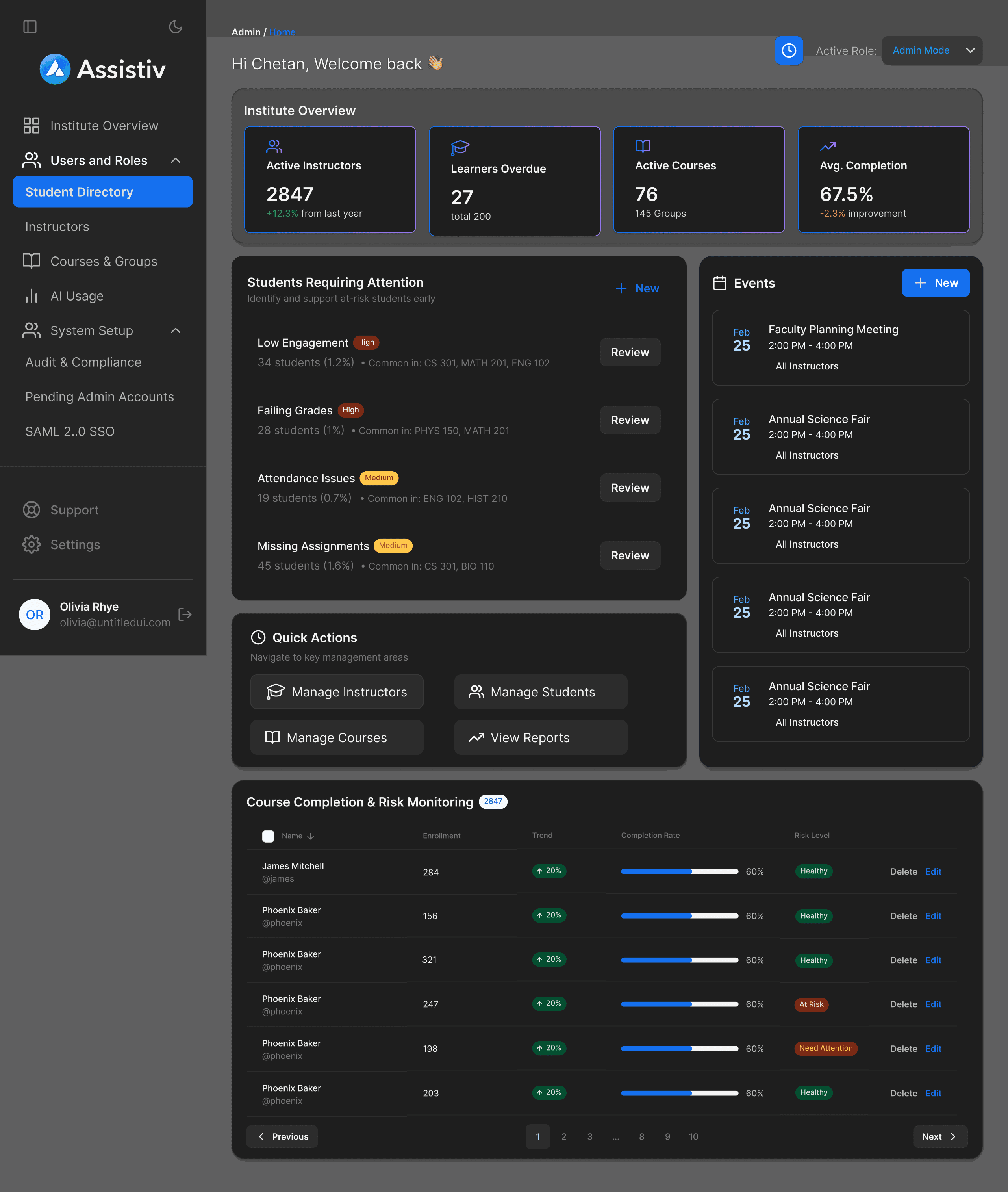
Admin Dashboard
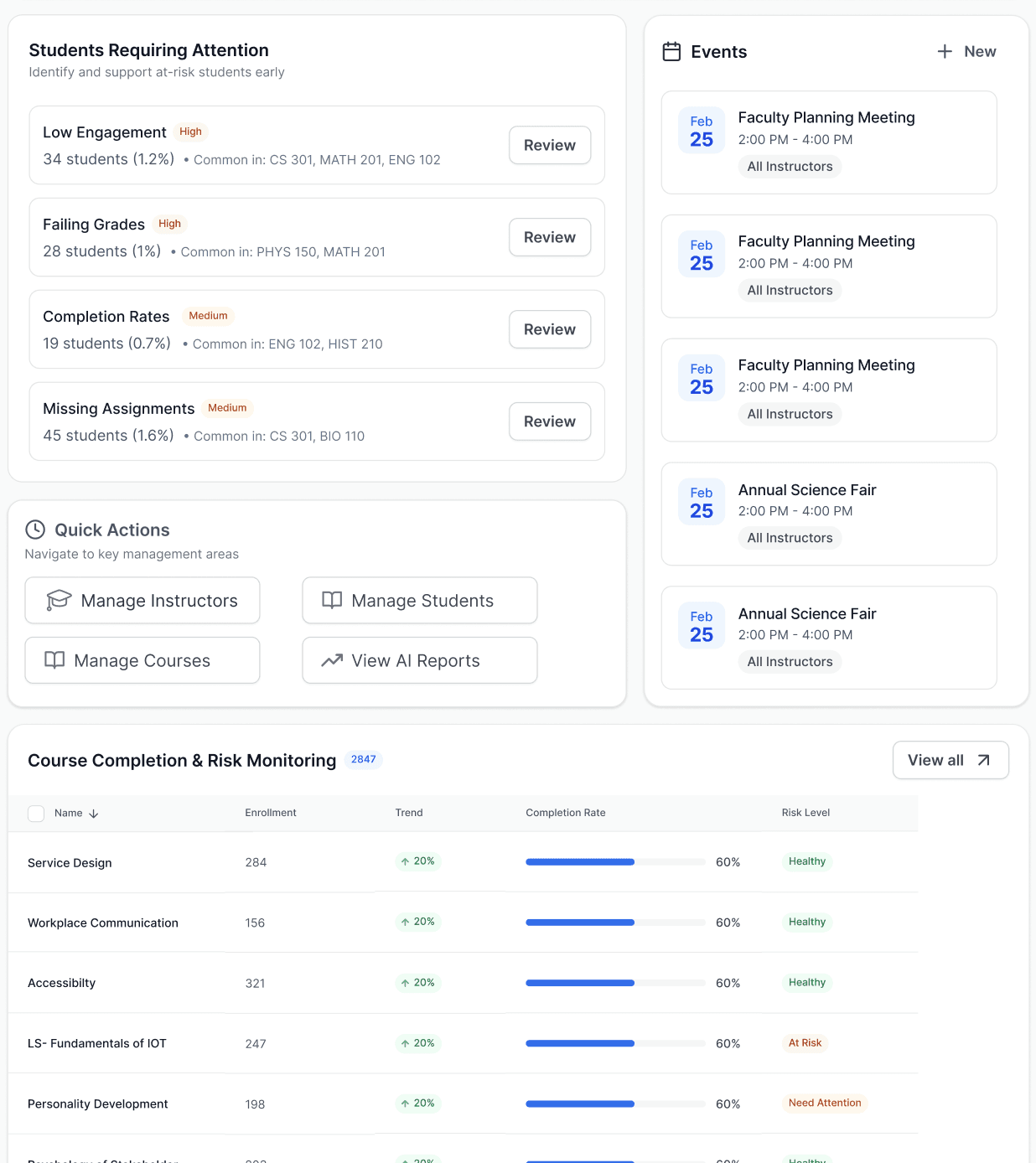
The first question on login is "Who needs my attention?", not How are we doing?"
Institute overview KPIs - Students requiring attention - Quick actions - course completion & Risk monitoring table. Three question. In that order. Every time.
1
2
4
3
1
Students requiring attention, groups by type, so admins act on patterns. One click reviews all affected students for that risk
2
"Common in CS301 or MAT201" means one intervention reaches many students. The dashboard cross references so the admin doesn't have to.
3
Single events only. No recurring, no external sync. A working simple calendar beats a broken full one.
4
Table, not chart
Admins pick a course to act on not analyze a trend. Tables serve action.
What I tried first?
Initial design used bar graphs. Early feedback flagged cognitive load. Switched to a color-coded risk table, cognitive load dropped significantly.
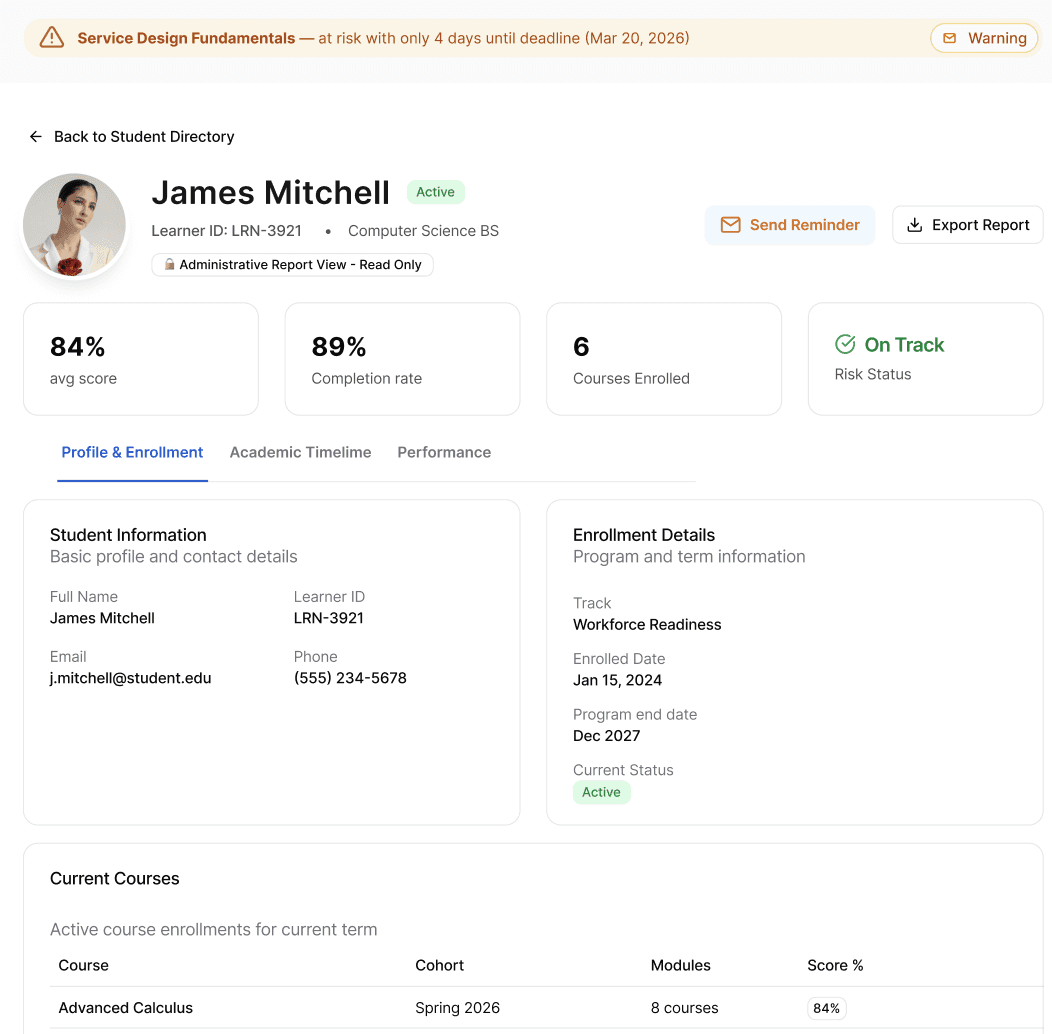
Student Profile + Reminder
Spotting a problem and acting on it should be on emotion
⚠️
Warning banner appears on profile
📧
Admin clicks Send Reminder

AI drafts the message
*or admin writes their own
📤
Sent via Outlook
📋
Logged in learner activity history
Profile & Enrollment
Performance
Send Reminder
1
2
3
4
1
Warning appears above the profile header. Admin sees the problem before the student name.
2
Admins see data only. Sets expectation upfront and protects data integrity.
3
Course, cohort, modules, score % which courses are dragging performance, at a glance.
4
Workforce Readiness track in the header. No digging for what program this student is in.
A real constraint that shaped the profile
Highly personal student data, including disabilities, medications, and medical history, cannot be stored on the platform without renewing specific compliance certifications (NIST/COPA). This wasn't a design preference; it was a hard boundary. The profile shows what's legally safe to show: academic performance, enrollment details, attendance, and course history. Sensitive personal data stays off-platform until compliance is renewed.
Role management and custom roles
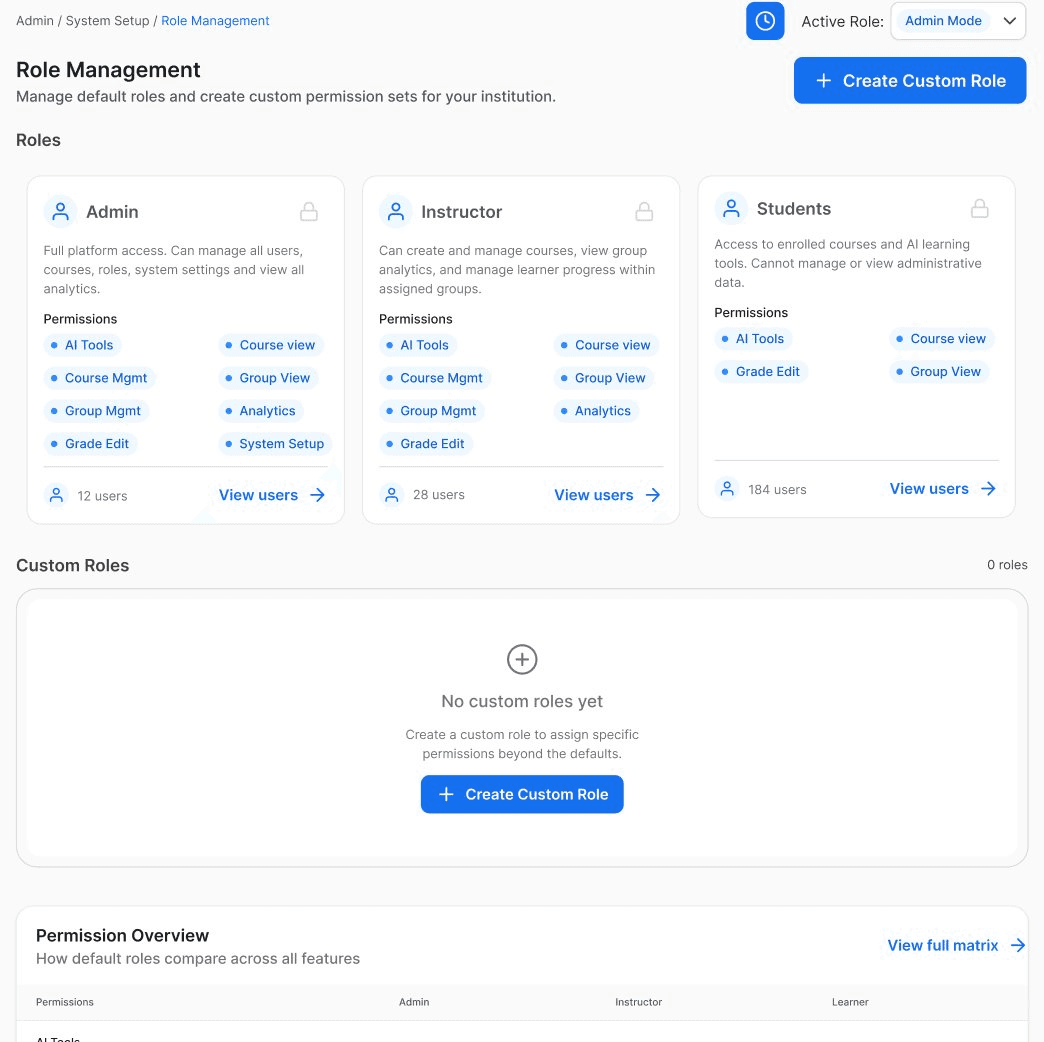
Not just Default roles, every organization can build its own
Three default roles ship out of the box, but because Assistiv is white-labeled, every client organization is structured differently. The custom role builders let them define exactly what access means for their team.
🏗️
Build from Scratch
📋
Inherit from default
⚙️
Toggle 5 categories
✅
Save + Assign
Default Roles
Custom Role Builder
Why this matters for white-labeled clients
Project Restart and Calibre Health are struc,tured completely differently. Hardcoding three role types forces every client into a structure that doesn't fit. Custom roles make the system genuinely adaptable not just visually rebrandable.
Impact & Insights
What I actually learned and what
I didn't expect to.
Client Organizations
x
platform growth
1 -> 1.5
System stress tested
What I actually walked away with
At Pratt, critiques are a structured part of the process. In contrast, at FTF, I experienced a more spontaneous moment when Joshua read a client's farewell email during a meeting. This moment reshaped my understanding of priorities, not based solely on the time invested, but on who is currently facing challenges.
It also made a concept from my coursework resonate deeply. We often discuss mental models in UX design, highlighting how users approach a product with pre-existing notions of how it should function. The departing site director wasn't perplexed by a button; they were uncertain about the very existence of their role within the product. This is not merely a visual flaw; it calls for a fundamental restructuring, not just a cosmetic adjustment.
A significant part of my role involves clarifying issues for everyone involved: the engineers, the CEO, and the clients. While the interfaces are what people interact with, the clarity that underpins them is what truly drives successful outcomes.
What's Next
The instructor role, onboarding, and real user testing
The admin screens are with engineering. The instructor side, the thing that started all of this, is next on my list. And once there's a full draft of every flow, there's a plan actually to sit down with admins and watch them use it. The site director who left won't come back. But the next one shouldn't have a reason to go.